> ## Documentation Index
> Fetch the complete documentation index at: https://vrchat-docs.moverse.ai/llms.txt
> Use this file to discover all available pages before exploring further.
# Getting Started
To get started and access the resources on this site, you must have purchased the **Moverse Capture for VRChat** bundle.
### 📦 Unboxing
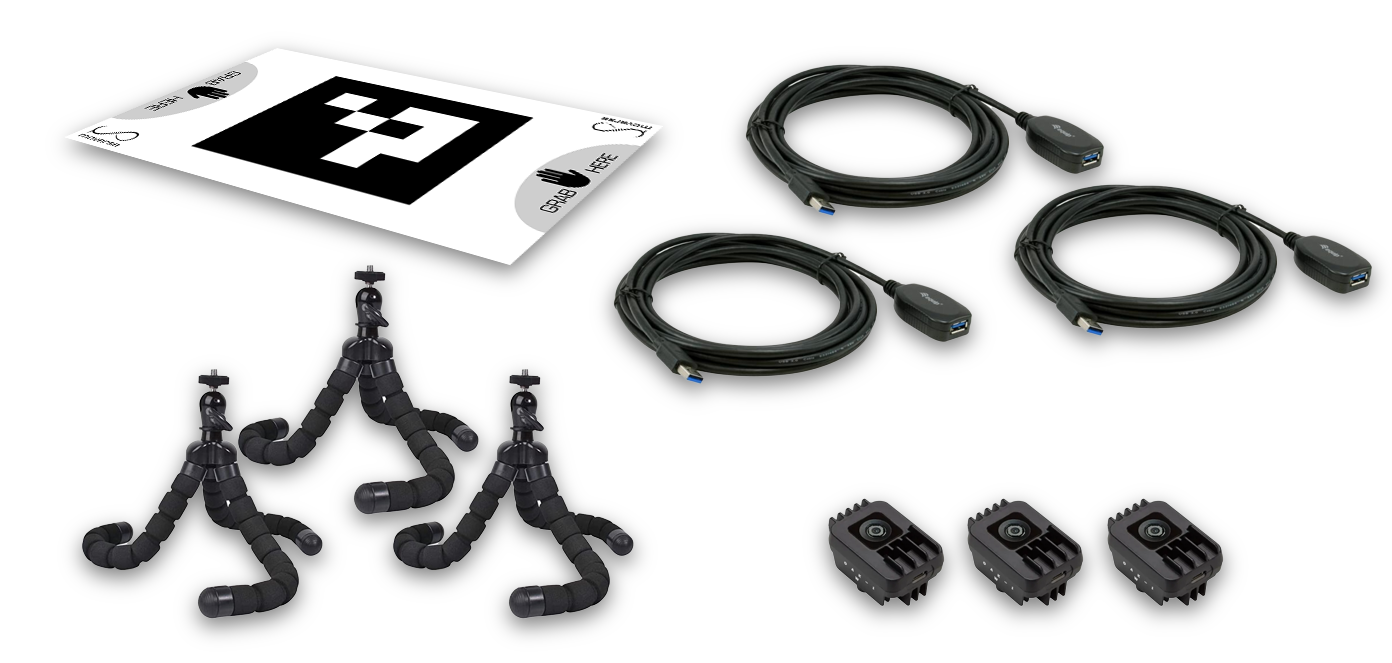
Before installing the Moverse software, ensure you have received all the following components:
* **3x OAK-1 W USB Cameras:** A 12MP AI camera that captures high-resolution images and runs our AI models. It uses a single USB-C cable for both power and USB 3 connectivity. Its Wide FOV allows you to capture a larger area in one shot.
* **3x Mini Mounts:** Flexible small tripods for mounting the cameras around your PC setup.
* **3x USB Extension Cables:** Used to connect the USB cameras to your PC.
* **1x Calibration Board:** A square board with a printed marker, used to calibrate the cameras before using Moverse Capture with VRChat.
#### ⚙️ Minimum PC Specs
Before installing Moverse Capture, ensure your system meets the following minimum requirements:
* **Operating System**: Windows 11
* **Processor**: Intel i7 12th gen or higher
* **RAM**: 32GB minimum
* **Graphics Card**: NVIDIA GTX 3050 or higher
* **Hard Drive**: At least 10GB of free disk space
### 🚀 Sign-up
To begin using Moverse Capture for VRChat, you'll need to create an account.
Visit the [Moverse Portal](https://portal.moverse.ai/) and sign up.
After completing the sign-up process, you'll receive an email with a link to download the Moverse Capture for VRChat software **installer**.
##### Installation
1. **Run the Installer**: Use the link from your email to download the installer. Double-click the `.exe` file and follow the on-screen instructions to install the software.
2. **Run Moverse Hub**: Locate the shortcut on your desktop or in your applications folder and run it.
### ❓ Need Help?
If you encounter any issues or have questions, please contact our support team in the [#get-help](https://discord.com/channels/1069970354937806970/1069977121121894430) channel on our Discord.
 #### ⚙️ Minimum PC Specs
Before installing Moverse Capture, ensure your system meets the following minimum requirements:
* **Operating System**: Windows 11
* **Processor**: Intel i7 12th gen or higher
* **RAM**: 32GB minimum
* **Graphics Card**: NVIDIA GTX 3050 or higher
* **Hard Drive**: At least 10GB of free disk space
### 🚀 Sign-up
To begin using Moverse Capture for VRChat, you'll need to create an account.
Visit the [Moverse Portal](https://portal.moverse.ai/) and sign up.
After completing the sign-up process, you'll receive an email with a link to download the Moverse Capture for VRChat software **installer**.
##### Installation
1. **Run the Installer**: Use the link from your email to download the installer. Double-click the `.exe` file and follow the on-screen instructions to install the software.
2. **Run Moverse Hub**: Locate the shortcut on your desktop or in your applications folder and run it.
### ❓ Need Help?
If you encounter any issues or have questions, please contact our support team in the [#get-help](https://discord.com/channels/1069970354937806970/1069977121121894430) channel on our Discord.
#### ⚙️ Minimum PC Specs
Before installing Moverse Capture, ensure your system meets the following minimum requirements:
* **Operating System**: Windows 11
* **Processor**: Intel i7 12th gen or higher
* **RAM**: 32GB minimum
* **Graphics Card**: NVIDIA GTX 3050 or higher
* **Hard Drive**: At least 10GB of free disk space
### 🚀 Sign-up
To begin using Moverse Capture for VRChat, you'll need to create an account.
Visit the [Moverse Portal](https://portal.moverse.ai/) and sign up.
After completing the sign-up process, you'll receive an email with a link to download the Moverse Capture for VRChat software **installer**.
##### Installation
1. **Run the Installer**: Use the link from your email to download the installer. Double-click the `.exe` file and follow the on-screen instructions to install the software.
2. **Run Moverse Hub**: Locate the shortcut on your desktop or in your applications folder and run it.
### ❓ Need Help?
If you encounter any issues or have questions, please contact our support team in the [#get-help](https://discord.com/channels/1069970354937806970/1069977121121894430) channel on our Discord.