

📦 Unboxing
Before installing the Moverse software, ensure you have received all the following components:- 3x OAK-1 W USB Cameras: A 12MP AI camera that captures high-resolution images and runs our AI models. It uses a single USB-C cable for both power and USB 3 connectivity. Its Wide FOV allows you to capture a larger area in one shot.
- 3x Mini Mounts: Flexible small tripods for mounting the cameras around your PC setup.
- 3x USB Extension Cables: Used to connect the USB cameras to your PC.
- 1x Calibration Board: A square board with a printed marker, used to calibrate the cameras before using Moverse Capture with VRChat.
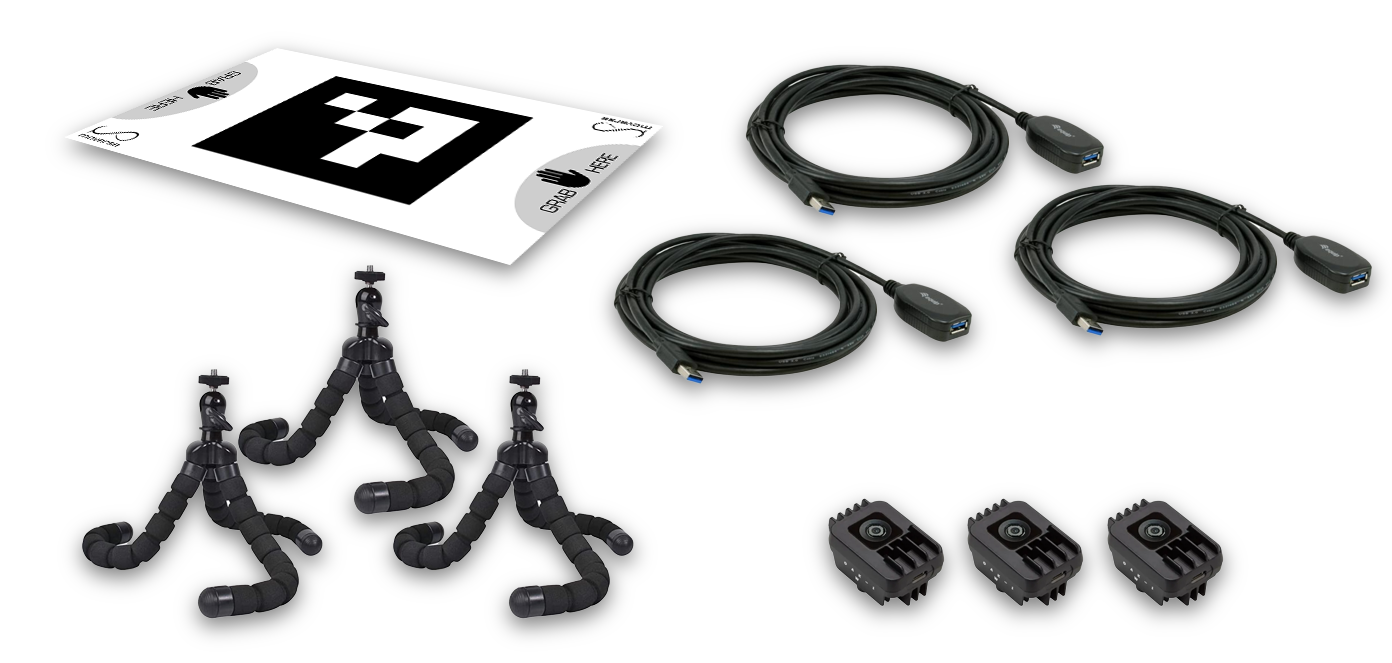
The 3-camera Moverse Capture setup with all required hardware components.
⚙️ Minimum PC Specs
Before installing Moverse Capture, ensure your system meets the following minimum requirements:- Operating System: Windows 11
- Processor: Intel i7 12th gen or higher
- RAM: 32GB minimum
- Graphics Card: NVIDIA GTX 3050 or higher
- Hard Drive: At least 10GB of free disk space
🚀 Sign-up
To begin using Moverse Capture for VRChat, you’ll need to create an account. Visit the Moverse Portal and sign up. After completing the sign-up process, you’ll receive an email with a link to download the Moverse Capture for VRChat software installer.Installation
- Run the Installer: Use the link from your email to download the installer. Double-click the
.exefile and follow the on-screen instructions to install the software. - Run Moverse Hub: Locate the shortcut on your desktop or in your applications folder and run it.